
AI Customer Support Platform for Faster Ticket Resolution
A SaaS or service team comparing AI support automation options before choosing an app development company.
Buyer context
The business problem was measurable before the first model call
Why it mattered
The bottleneck was not only response speed. Slow support was creating churn risk, higher operating cost, and weaker customer trust.
This buyer had enough ticket volume to make automation valuable, but still needed human control over risky replies, refunds, account changes, and edge cases.
Product walkthrough
A support platform needs workflow control, not only generated replies
Escalation logic
Auto-answer repeated questions
Route sensitive cases to humans
Measure reopen and satisfaction impact
Architecture
The useful part is the system around the model
Knowledge and ticket memory
Historical tickets and support knowledge shaped retrieval, answer examples, and escalation rules.
Routing and action policy
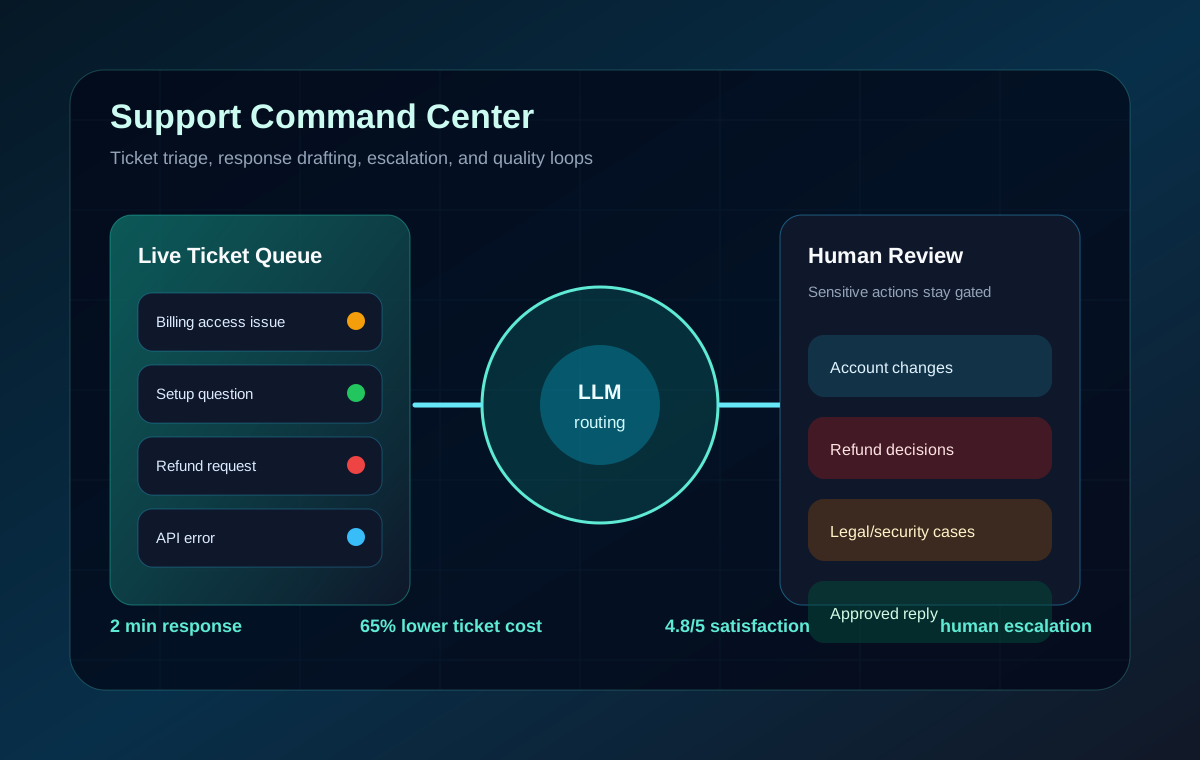
The platform separated safe auto-replies from account, refund, and security cases that needed review.
Quality monitoring
Reopen rate, CSAT, response time, and sample review kept the automation accountable.
CRM integration
The system connected to existing customer records so support actions fit the operating workflow.
Technical implementation
Custom fine-tuned GPT model trained on 50,000+ support tickets, real-time integration with the CRM, automated ticket routing, and a performance monitoring dashboard.
Before / after
The page has to teach the decision, not just announce the win
Before
The company was losing customers due to slow support response times. Their support team was overwhelmed with 200+ tickets daily, taking 4-6 hours each to resolve.
Build
We implemented an AI-powered support system using LLM fine-tuning on domain data. The system automatically categorizes tickets, provides instant responses, and escalates complex issues to human agents.
After
The AI system now handles 80% of support tickets automatically, reducing response time from 4-6 hours to 2 minutes. Customer satisfaction increased from 3.2/5 to 4.8/5, and support costs dropped by 65% per ticket.
How we would build it today
A buyer can use this as a practical project brief
Start with a ticket taxonomy and escalation policy before model selection.
Use retrieval and fine-tuning only where each improves measured answer quality.
Add live QA sampling, drift checks, and agent-performance analytics from day one.
Connect the support copilot to CRM, billing, and helpdesk tools through scoped actions.
Buyer checklist
Decision framework
When this kind of build is the right move
Use AI first when
There is repeated ticket volume, stable product knowledge, and clear escalation rules.
Keep humans first when
Requests involve legal, billing, security, or relationship-sensitive judgment.
Measure success by
Resolution time, deflection rate, CSAT, reopen rate, and cost per ticket.
Caveats
The system depended on enough historical ticket data to capture common patterns.
Human escalation stayed in the loop for ambiguous or account-sensitive tickets.
The 94% accuracy metric refers to the measured support-response workflow, not unrestricted general reasoning.
Next steps
If this looks like your problem, start with the closest intent path
What should a SaaS support team look for before starting this kind of AI project?
Start with a measurable workflow, clean access to the relevant data, a clear escalation or review path, and agreement on the success metric. TensorBlue uses those inputs to decide whether AI customer support automation should be a prototype, a production workflow, or a phased rollout.
How much of the result came from AI versus product engineering?
The AI model was only one layer. The outcome came from data preparation, workflow design, product UX, integration, monitoring, and adoption planning around the model. That is why the case study focuses on the full system, not only the model choice.
Can this be rebuilt for a different company without copying the same implementation?
Yes, but the workflow, integrations, controls, and measurement plan need to be redesigned around the new business. The reusable part is the delivery pattern; the exact implementation should stay specific to the buyer's data, users, and operational constraints.
What is the main caveat behind the published result?
The reported ROI assumes the support team had enough repeated ticket volume and used human escalation for sensitive cases.